
Docs Playing
Controls and controllers
Every action's key and controller button out of the box, the chat and staff keys, how a controller works in the menus, and the touch controls on a phone.
The keys are the original's own, from its config.cfg; the controller's buttons are ours, since the original had none. Every action can be set to another key and another button in Options, Controls.
Keys and buttons
| Action | Key | Xbox | PlayStation |
|---|---|---|---|
| Forward, back, left, right | W S A D | left stick | left stick |
| Look | the mouse | right stick | right stick |
| Jump | Space | A | Cross |
| Crouch | Left Shift | B | Circle |
| Walk | Left Ctrl | left stick, clicked | L3 |
| Fire | left button | RT | R2 |
| Scope | right button | LT | L2 |
| Reload | R | X | Square |
| Use: plant, defuse, open, take | E | X, held | Square, held |
| Last weapon | F | RB | R1 |
| Drop the weapon | F, held | ||
| Pick up a weapon | G | ||
| Primary, sidearm | 1 2 | ||
| Melee | 3 | right stick, clicked | R3 |
| Throwing (again: the next one carried) | 4 | LB | L1 |
| Next weapon, previous weapon | the wheel | Y (next) | Triangle (next) |
| 3rd person, where the room allows it | Q | d-pad down | d-pad down |
| Scores | Tab | View | Share or Create |
| Radio: command, general, reply | Z X C | d-pad left, up, right | the same |
| Spray | T | ||
| The mission, held | O | ||
| Hide the HUD | H | ||
| Blood on or off | B | ||
| Level the view | End | ||
| Turn and look with the keys | the arrow keys | ||
| Horror Mode items | 5 6 7 | ||
| The match menu | Esc | Menu (fixed) | Options (fixed) |
A kit carries up to three throwables (a grenade, a flash-bang, a smoke): 4 takes out the first, and each press after it the next. The bar along the top of the screen shows the kit for a moment after each switch, the other throwables under the one in hand.
On a controller X does two things: tapped, it reloads; held at a bomb site, it plants. An undead's skills (Horror modes) sit on the keys of weapons 2, 3 and 4, reload and scope, shown on its skill bar with their cooldowns.
Chat and the other keys
| Key | What it does |
|---|---|
| Enter or F3 | say something to everyone in the match |
| Y or F4 | to your side |
| F5 | to your clan |
| F6 | to global chat |
| F1 / F2 | yes / no, while a vote to kick is on |
| F8 | the weapon view: the lens your gun is drawn through |
| F9 | the staff panel, for a server's staff |
In a lobby's chat box, /w name text whispers, /r text answers the last whisper, and /c, /g, /t and /a speak to the clan, global chat, the team and everyone.
A controller
Xbox controllers (anything XInput), the DualShock 4 and the DualSense work by cable or by Bluetooth. Linux, macOS and Android take the same controllers through the system's own controller support (platforms). With Play with a controller ticked in Options, Controls, Controller, one is used as soon as it is plugged in, and the page says which it found.
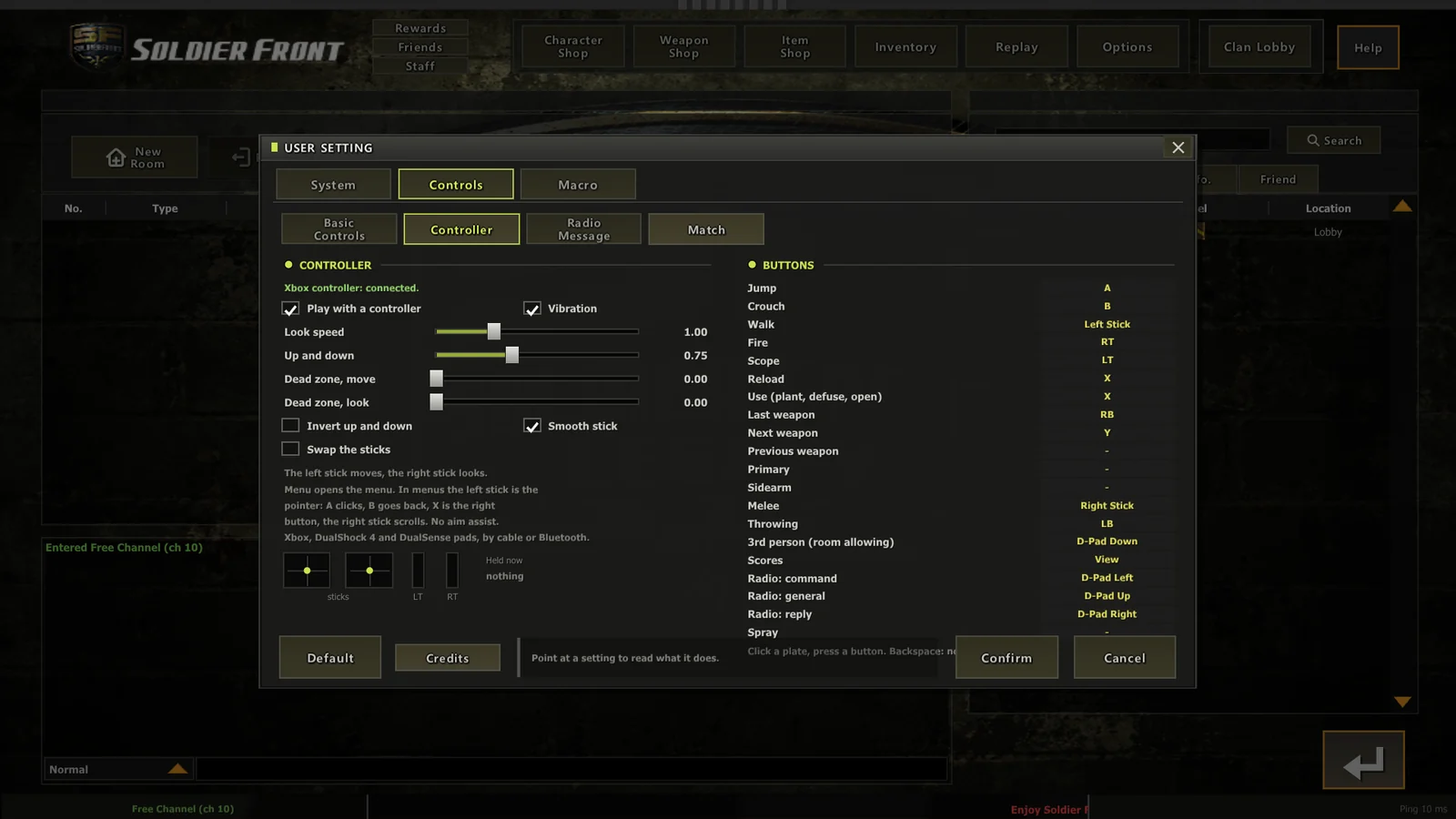
Setting buttons. In Options, Controls, Controller click an action's plate and press the button. Backspace takes a button off an action.
The sticks. The left stick moves and the right stick looks, or the other way round with Swap the sticks. Look speed is 220 degrees a second at 1.00. You can also set up and down against across, invert, a smooth or a linear stick, more dead zone for either stick, and vibration (a hit taken, a blast, a shot).
In the menus the left stick is the pointer: A clicks, B goes back like Esc, X is the right button and the right stick scrolls. The lobby is the original's own pages, made for a mouse, and the pointer works on every one of them.
With a radio list open the d-pad picks the line, A says it and B closes it. Dead in a round without respawn, the shoulder buttons step through your team and A changes the view.
Typing (signing in, chat, a room's name) still wants a keyboard on a PC or a Mac; on a phone its own keyboard comes up.
On a phone
On Android the touch screen is the controls in a match, and the phone's own keyboard comes up for every text field.
| Where | What |
|---|---|
| Left thumb | the stick, set down wherever the thumb lands: pushed part way it walks (quietly, as Walk), all the way it runs |
| Right thumb | Fire (the biggest; it also aims while you hold it and drag), Aim (on a gun with a scope), Jump, Crouch (tap on, tap off), Reload, Swap (the next weapon you carry), Use (held: plant, defuse, open) |
| Anywhere else | swipe to look |
| Along the top | Menu, Chat and Score (tap on, tap off) |
| The phone's Back | the menu, as Esc |
A second Fire over the stick, for the left thumb, is on by default. Size, look speed and opacity are in Options, Controls, Touch; up and down follow Invert the mouse. Arrange on the screen, on the same page, shows every control where it is: drag each one where you want it, pick one and make it smaller or bigger, or put one or all of them back. The stick's place is where it rests; it still comes to your thumb anywhere low on that side, so moving it to the right makes a left-handed layout. In a match, the menu's Settings take you there with the match behind. Dead in a round without respawn, Fire steps through your team and Jump changes the view.
A controller, or a Bluetooth keyboard and mouse, works on a phone too: using one puts the touch controls away, and touching the screen brings them back.
There is no aim assist. A controller plays the same match as a mouse, on the same terms. Soldier Front was a mouse game; an assist would be the server's to police and the lobby's to argue about.